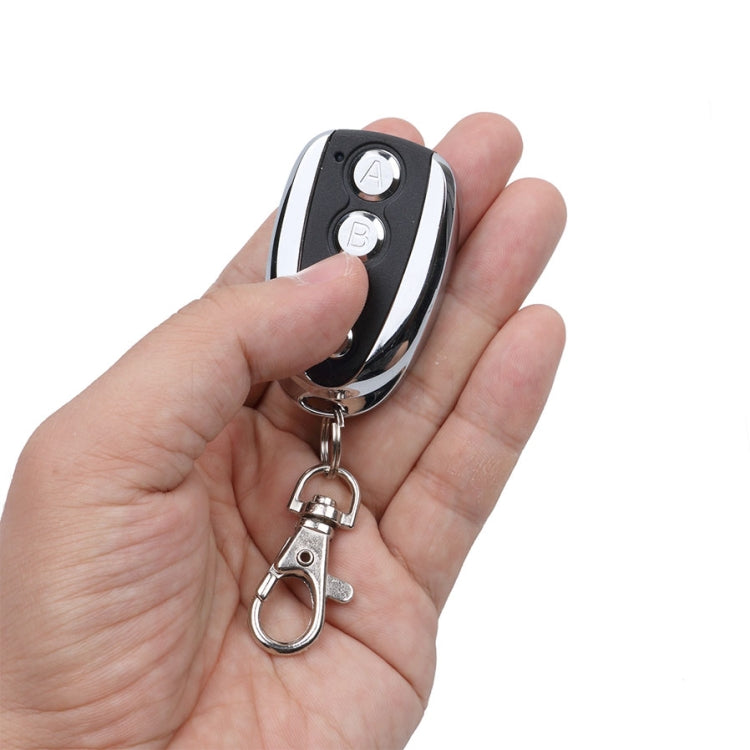
K18 Universal U-shaped Copy Electric Rolling Shutter Door Gate Garage Remote Controller, Frequency:433MHZ
K18 Universal U-shaped Copy Electric Rolling Shutter Door Gate Garage Remote Controller, Frequency:433MHZ

Spread the cost
No lump sum. No stress. Pick a repayment term that works for your budget — and keep your cash flow intact.
- R72.47/mo 3 months
- R36.64/mo 6 months
- R19.34/mo 12 months
- From R72.47/month over 3 months, or as low as R19.34/month over 12. Total repayable over 12 months: R232.08. Interest at 20.75% p.a. applies.
- Quick online application — most people get a decision within minutes. Your first payment only kicks in 30 days after you buy.
- Mobicred is a registered South African credit provider (NCR reg. NCRCP7852). Available to SA residents aged 18+ with a valid ID and bank account.
At checkout, simply select Mobicred as your payment method.
Continue to checkoutDon't have Mobicred yet? Apply free — takes about 2 minutes →
Mobicred is a revolving credit facility provided by Retail Capital (Pty) Ltd, a registered credit provider (NCR reg. NCRCP7852) in terms of the National Credit Act 34 of 2005. Credit is subject to approval and an affordability assessment. Interest rate: 20.75% p.a. compounded monthly (1.7292%/month). Available to South African residents aged 18 and older. Full terms & conditions apply.
Import Taxes Included
Read shipping & tax policy ›This product is priced for DDP import handling. KifTech handles applicable import costs before delivery:
- Import duties – Included where applicable
- Customs fees – Handled before delivery
- Shipping – Free on orders over R750. R49 standard rate below R750.
✓ The checkout total shows the product and shipping amount you pay to KifTech. No separate import duty payment should be required on delivery.
Free Shipping over R750
R49 below R750. Taxes included. Read policy ›
Estimated Arrival
8–17 business days after order placement.
Delivery Timeline
Order Processing (0–3 days)
Order verified and dispatched. Tracking details provided by email.
Transit (8–14 business days)
Package is shipped internationally to South Africa via Buffalo Logistics.
30-day refund / replacement
Read full return policy ›Shipping Protection
Read full policy ›Encrypted Checkout
Read privacy policy ›Checkout uses encrypted payment processing to help protect your personal and payment details.
Accepted via PayFast:
Product Overview
2. Strong privacy
3. Save each key password separately
4. Can be reused continuously for 1 million times
5. Uses: garage doors, motorcycles, car alarm products, home security products, short-distance wireless remote control products, industrial control products, etc.
6. Working voltage: DC12V, one 27A battery (not included)
7. Working current: less than or equal to 8mA
8. Encoding type: self-copying
9. Modulation method: ASK (AM)
10. Transmitting power: ≤100mW
11. Transmitting distance: 50 -100 m
12. Use with the following remote control IC modules (please check your original remote control before ordering), and your remote control should also be a fixed code or a learning code. 2260 (all manufacturers), 2262 (all manufacturers), PT2264 (all manufacturers), 5326 (all manufacturers), 527 (all manufacturers), 1527 (all manufacturers), 2240 (all manufacturers), HT6026 , HT6012, HT6014, HT600, HT680, HT6010, HT6207, HT640, HT6P12E, HT6P20D, 12L-4SC, PT2292, 12L4SC, SC5262, PLC168, NF9420116, UM3750AM, SMC918, SMC908, 1416, 5211, HCS101, HCS200, HCS201, HCS300 , HCS301 (partial code)
How to program:
1. Please clear the test code before copying: press the above 2 buttons at the same time until the LED light flashes 3 times quickly, then release any button (the other is kept pressed), and then press the button 3 times, the LED light After flashing quickly, release the two buttons. When you press any button, the LED will not light up, which means you have deleted the code
2. Learn the code: press and hold the buttons on the remote control, the same is true for the buttons on the remote control, keep them close to the receiving signal for 3 seconds, the LED light will flash quickly and then stay on, then release the button. Try to press this button, the LED light will light up, indicating that you have successfully copied. Do the same steps for the other buttons
3. Recovery function: If you accidentally delete the useful code, you can press the 3rd&4th button at the same time until the LED light flashes 3 times quickly, the recovery is successful
4. Now the programming is successful: if you want to program more buttons, just repeat step 2 greater than 4. Its that simple! To reset the remote control, just restart step
Product checks
Check fit before you buy
Review model, version, connector, size, photos, specifications, and package contents before checkout.
Compatibility checklist
- Match the exact product, device, model, size, colour, and variant shown in this listing.
Have questions about this product? Need help choosing? Contact our support team for assistance!