


YOUTING YT-203HD 2 In 3 Out KVM USB3.0 Switch EU Plug
YOUTING YT-203HD 2 In 3 Out KVM USB3.0 Switch EU Plug
Free shipping on this item

Pay with Mobicred
Mobicred is a revolving credit facility. One monthly account payment covers your purchases.
- Interest and fees apply. Your repayment amount, interest rate and applicable fees are set out in your Mobicred agreement.
- Credit is subject to approval and an affordability assessment. You need an approved Mobicred account and sufficient available credit.
Choose Payfast at checkout, then select Mobicred on the Payfast payment page where it is available.
Mobicred credit is provided by RCS Cards Proprietary Limited, trading as Mobicred. RCS is a registered credit provider (NCRCP38). Read Mobicred terms and conditions
Free Shipping over R750
R49 on orders of R750 or less. Duties included, no VAT collected. Read policy ›
Delivery timeline
Shipping protection Read full policy ›
Duties included at checkout, no VAT collected
Read shipping and duties policy ›KifTech uses a Delivered Duty Paid (DDP) delivery process for all orders. Applicable import duties and customs fees are included in the price shown at checkout and handled before delivery. No VAT is collected from you at checkout.
- Import duties – Included in the price shown at checkout where applicable
- Customs fees – Included in the price shown at checkout and handled before delivery
- Shipping – Free on orders over R750. R49 standard rate on orders of R750 or less.
✓ The checkout total shows the product amount and any shipping charge. Applicable import duties and customs fees are included in the price shown at checkout. No VAT is collected from you at checkout. No separate duties or customs-fee payment should be required on delivery.
30-day returns & 6-month fault cover
Read full return policy ›Encrypted Checkout
Read privacy policy ›Checkout uses encrypted payment processing to help protect your personal and payment details.
Accepted payment methods:
Description
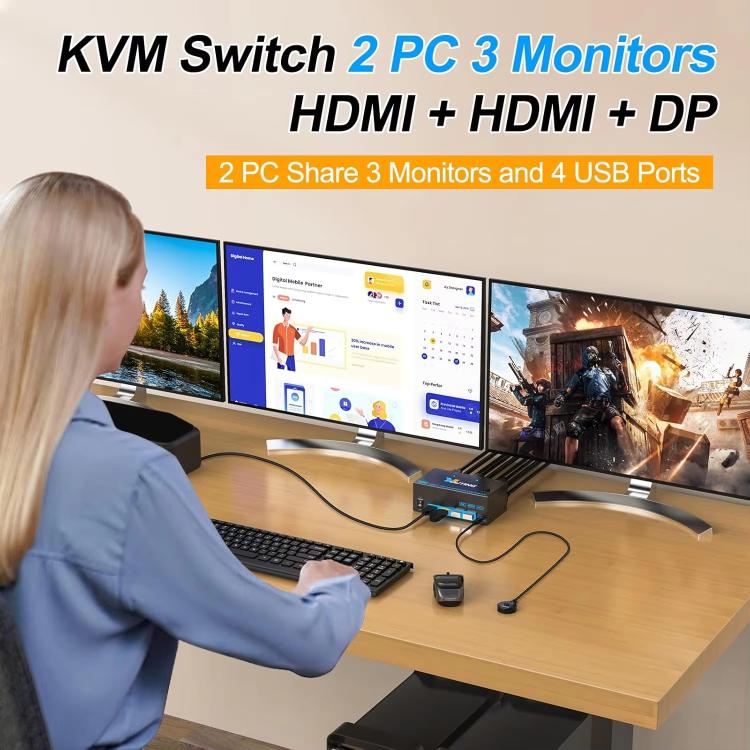
1. Supports 2 computers and 3 monitors (2 HDMI ports + 1 monitor port), suitable for devices equipped with DP and HDMI ports, allowing 2 computers to share a set of mouse, keyboard and monitor
2. Press Windows+P to select mirrored screen or extended display screen
3. Video output is achieved through 1 DP port and 2 HDMI ports
4. With 4 USB3.0 ports, 2 computers can share 4 USB3.0 devices without disconnecting, and can safely identify wireless mouse, keyboard, printer, scanner and other USB devices
5. Supports ultra-high-speed data transmission up to 5 Gbps, and is backward compatible with USB 2.0/1.1 devices, compatible with HDMI 2.1, DisplayPort 1.4, HDCP 2.3
6. 2 HDMI ports support 8K 60Hz, 4K 60Hz and backward compatibility, and DisplayPort interface supports 4K 144Hz, 8K 30Hz, 3440 x 1440 144Hz, 4K 60Hz, 2K 144Hz, 1080P
7. Plug and play, easy installation, no additional driver software required
8. Freely switch between 2 computers via 1.5m cable remote control or KVM switch DisplayPort/HDMI control panel button
9. LED indicator shows the computer currently being operated
10. Wide compatibility, supports 2 computers and 3 monitors, compatible with a variety of HDMI and DP input devices, such as computers, laptops, TV boxes, Blu-ray players, projectors and monitors, etc.
11. Note: 3 monitors can only receive input signals from computers
Specifications
- Brand
- YOUTING
- Product type
- Switch
- SKU
- TBD0606150001
- Dispatch facility
- International Fulfillment Center (China)
Compatibility & fit
Product checks
Check fit before you buy
Review model, version, connector, size, photos, specifications and package contents before checkout.
Compatibility checklist
- Match the exact product, device, model, size, colour and variant shown in this listing.
- Brand names are used to identify compatibility unless the listing clearly states otherwise.
- This may be a repair or replacement part. Match the exact model, version, connector and part type before ordering.
- Professional installation may be required.
- For screen or digitizer parts, test before installation and keep protective films or tags in place until testing is complete.
- For powered products, check voltage, wattage, current, connector type, charger compatibility and plug type before use.
Have questions about this product? Need help choosing? Contact our support team for assistance!


More from PC Components & Parts
View all PC Components & Parts-
7 in 1 Type-C to HDMI + SD/TF + 2 x Type-C + 2 x USB3.0 Multi-function Splitter Adapter
Regular price R 309.00Regular price -
For Lenovo Motherboard Adapter Cable, Spec: 24Pin To 10Pin(20cm)
Regular price R 229.00Regular price -
BOVBOX 081 400m Range 1080P HD Video Transmitter Receiver Use Wireless HDMI Extender, Plug:AU Plug
Regular price R 3,229.00Regular price -
VGA & Audio Extender 1920x1440 HD 100m Cat5e / 6-568B Network Cable Sender Receiver Adapter, EU Plug(Black)
Regular price R 659.00Regular price -
AM4 CPU Radiator Rack Support AMD Computer Motherboard Base(Black)
Regular price R 189.00Regular price -
PCE7USB-R05 PCI-E to USB 3.2 Gen1 7-Port Expansion Card
Regular price R 539.00Regular price -
Digital To Analog Audio Converter Stereo Extractor DAC Amplifier Optical SPDIF 192Khz 24Bit
Regular price R 659.00Regular price -
USB C Hub 7-in-1 USB C Multiport Adapter with HDMI 100W PD and SD/TF Card Reader
Regular price R 309.00Regular price -
For HP 15-G 15-R 15-H 15-S Switch Button Small Board
Regular price R 219.00Regular price -
For HP Elitebook 840 G5 846 G5 745 G5 US Version Keyboard with Pointing Stick (Silver)
Regular price R 819.00Regular price -
For HP ProBook 450 G8 455 G8 455R G8 650 G8 HSN-Q27C HSN-Q31C US Version Keyboard with Backlight
Regular price R 779.00Regular price -
4RS 12cm Computer Case Fan with Infinity Mirror ARGB Thermal Control & Ultra Quiet Cooling(Forward Black)
Regular price R 469.00Regular price -
8A DC Power Plug 5.5 x 2.1mm Male to Male Adapter Connector Cable, Length:50cm(Black)
Regular price R 199.00Regular price -
COOLMOON AM10 ARGB+PWM Dual 10 Ports Temperature Control Splitter Case Fan 5V 3Pin HUB(Black)
Regular price R 349.00Regular price


