


YNS-03 DDR4 / DDR5 2-in-1 Memory Tester Memory Test Card Notebook Memory Stick Tester
YNS-03 DDR4 / DDR5 2-in-1 Memory Tester Memory Test Card Notebook Memory Stick Tester
Shipping R49 · free over R750

Pay with Mobicred
Mobicred is a revolving credit facility. One monthly account payment covers your purchases.
- Interest and fees apply. Your repayment amount, interest rate and applicable fees are set out in your Mobicred agreement.
- Credit is subject to approval and an affordability assessment. You need an approved Mobicred account and sufficient available credit.
Choose Payfast at checkout, then select Mobicred on the Payfast payment page where it is available.
Mobicred credit is provided by RCS Cards Proprietary Limited, trading as Mobicred. RCS is a registered credit provider (NCRCP38). Read Mobicred terms and conditions
Free Shipping over R750
R49 on orders of R750 or less. Duties included, no VAT collected. Read policy ›
Delivery timeline
Shipping protection Read full policy ›
Duties included at checkout, no VAT collected
Read shipping and duties policy ›KifTech uses a Delivered Duty Paid (DDP) delivery process for all orders. Applicable import duties and customs fees are included in the price shown at checkout and handled before delivery. No VAT is collected from you at checkout.
- Import duties – Included in the price shown at checkout where applicable
- Customs fees – Included in the price shown at checkout and handled before delivery
- Shipping – Free on orders over R750. R49 standard rate on orders of R750 or less.
✓ The checkout total shows the product amount and any shipping charge. Applicable import duties and customs fees are included in the price shown at checkout. No VAT is collected from you at checkout. No separate duties or customs-fee payment should be required on delivery.
30-day returns & 6-month fault cover
Read full return policy ›Encrypted Checkout
Read privacy policy ›Checkout uses encrypted payment processing to help protect your personal and payment details.
Accepted payment methods:
Description
2. Computer memory failure: The failure of computer memory is mainly due to poor contact of gold pins, wear of gold pins, damage to PCB, data line exclusion damage, open circuit and short circuit of video memory, poor memory performance, etc.
3. LED indicator: The LED indicator is used to test all data lines of memory, and normal brightness is normal. When there is a hardware failure in these data line loops, there will be an abnormal situation of lighting or not lighting
4. Purpose: If the test indicator light flashes, it means that the gold pin contact is poor. If there is no indicator light, it means that the hardware has an open circuit failure. Check the wear of the gold pins to exclude whether it is damaged and whether the PCB is disconnected
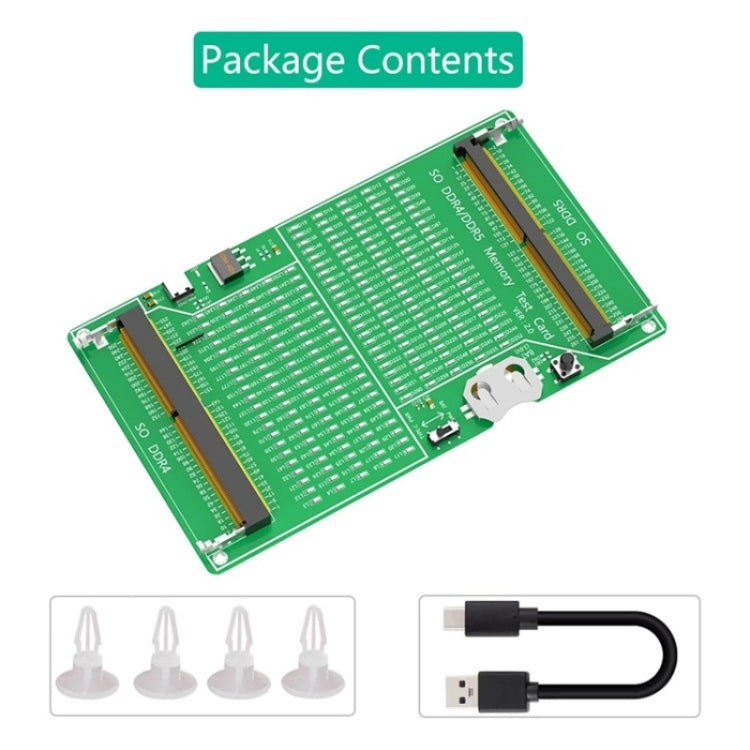
5. How to use: Insert the CR2032 battery into the battery holder of the test card, or connect the C-type cable, and then insert the memory card for testing
Laptop DDR4/DDR5 memory test steps:
1. Install the CR2032 button battery horizontally into the button battery holder of the test card, and make sure the battery silk screen side faces up (it must not be installed upside down)
2. According to the specifications of the memory stick (the position of the U-shaped notch in the middle of the DDR4/DDR5 gold finger is different), insert the memory stick into the black slot at an angle of 45 degrees, and press it down after it is inserted to the bottom so that the silver metal ear buckle can clamp the memory stick
3. Select the voltage switch position, one side is powered by the CR2032 button battery, and the other side is powered by the TYPE-C external power supply (the TYPE-C data cable needs to be connected)
4. Then press the black button (Test SW) on the test card. If the memory stick is a good product, the LED lights on the test card will all light up. If the memory stick is a defective product, the corresponding LED will not light up. According to the silk screen position number of the unlit LED, you can find the defective position of the memory stick gold finger
5. When the test is completed, release the black button, pry open the silver metal buckle of the memory slot with both hands at the same time, and pull out the memory stick at an angle of 45 degrees
Specifications
- Product type
- RAMs
- SKU
- SYA0026315
- Dispatch facility
- International Fulfillment Center (China)
Compatibility & fit
Product checks
Check fit before you buy
Review model, version, connector, size, photos, specifications and package contents before checkout.
Compatibility checklist
- Match the exact product, device, model, size, colour and variant shown in this listing.
- Brand names are used to identify compatibility unless the listing clearly states otherwise.
- For straps, cases, holders, covers and accessories, check the size and compatible model before ordering.
- This may be a repair or replacement part. Match the exact model, version, connector and part type before ordering.
- Professional installation may be required.
- For powered products, check voltage, wattage, current, connector type, charger compatibility and plug type before use.
Have questions about this product? Need help choosing? Contact our support team for assistance!


More from PC Components & Parts
View all PC Components & Parts-
7 in 1 Type-C to HDMI + SD/TF + 2 x Type-C + 2 x USB3.0 Multi-function Splitter Adapter
Regular price R 309.00Regular price -
For Lenovo Motherboard Adapter Cable, Spec: 24Pin To 10Pin(20cm)
Regular price R 229.00Regular price -
BOVBOX 081 400m Range 1080P HD Video Transmitter Receiver Use Wireless HDMI Extender, Plug:AU Plug
Regular price R 3,229.00Regular price -
VGA & Audio Extender 1920x1440 HD 100m Cat5e / 6-568B Network Cable Sender Receiver Adapter, EU Plug(Black)
Regular price R 659.00Regular price -
AM4 CPU Radiator Rack Support AMD Computer Motherboard Base(Black)
Regular price R 189.00Regular price -
PCE7USB-R05 PCI-E to USB 3.2 Gen1 7-Port Expansion Card
Regular price R 539.00Regular price -
Digital To Analog Audio Converter Stereo Extractor DAC Amplifier Optical SPDIF 192Khz 24Bit
Regular price R 659.00Regular price -
USB C Hub 7-in-1 USB C Multiport Adapter with HDMI 100W PD and SD/TF Card Reader
Regular price R 309.00Regular price -
For HP 15-G 15-R 15-H 15-S Switch Button Small Board
Regular price R 219.00Regular price -
For HP Elitebook 840 G5 846 G5 745 G5 US Version Keyboard with Pointing Stick (Silver)
Regular price R 819.00Regular price -
For HP ProBook 450 G8 455 G8 455R G8 650 G8 HSN-Q27C HSN-Q31C US Version Keyboard with Backlight
Regular price R 779.00Regular price -
4RS 12cm Computer Case Fan with Infinity Mirror ARGB Thermal Control & Ultra Quiet Cooling(Forward Black)
Regular price R 469.00Regular price -
8A DC Power Plug 5.5 x 2.1mm Male to Male Adapter Connector Cable, Length:50cm(Black)
Regular price R 199.00Regular price -
COOLMOON AM10 ARGB+PWM Dual 10 Ports Temperature Control Splitter Case Fan 5V 3Pin HUB(Black)
Regular price R 349.00Regular price


