


Indoor Temperature And Humidity Monitor Thermometer Hygrometer With Perpetual Calendar
Indoor Temperature And Humidity Monitor Thermometer Hygrometer With Perpetual Calendar
Shipping R49 · free over R750

Pay with Mobicred
Mobicred is a revolving credit facility. One monthly account payment covers your purchases.
- Interest and fees apply. Your repayment amount, interest rate and applicable fees are set out in your Mobicred agreement.
- Credit is subject to approval and an affordability assessment. You need an approved Mobicred account and sufficient available credit.
Choose Payfast at checkout, then select Mobicred on the Payfast payment page where it is available.
Mobicred credit is provided by RCS Cards Proprietary Limited, trading as Mobicred. RCS is a registered credit provider (NCRCP38). Read Mobicred terms and conditions
Free Shipping over R750
R49 on orders of R750 or less. Duties included, no VAT collected. Read policy ›
Delivery timeline
Shipping protection Read full policy ›
Duties included at checkout, no VAT collected
Read shipping and duties policy ›KifTech uses a Delivered Duty Paid (DDP) delivery process for all orders. Applicable import duties and customs fees are included in the price shown at checkout and handled before delivery. No VAT is collected from you at checkout.
- Import duties – Included in the price shown at checkout where applicable
- Customs fees – Included in the price shown at checkout and handled before delivery
- Shipping – Free on orders over R750. R49 standard rate on orders of R750 or less.
✓ The checkout total shows the product amount and any shipping charge. Applicable import duties and customs fees are included in the price shown at checkout. No VAT is collected from you at checkout. No separate duties or customs-fee payment should be required on delivery.
30-day returns & 6-month fault cover
Read full return policy ›Encrypted Checkout
Read privacy policy ›Checkout uses encrypted payment processing to help protect your personal and payment details.
Accepted payment methods:
Description
1. Temperature range: -20~60 degrees Celsius (-4~140 degrees Fahrenheit), error: +/-0.5 degrees Celsius
2. Humidity range: 10~99%RH, error: +/-3%RH;
3. Temperature and humidity are refreshed every 10 seconds;
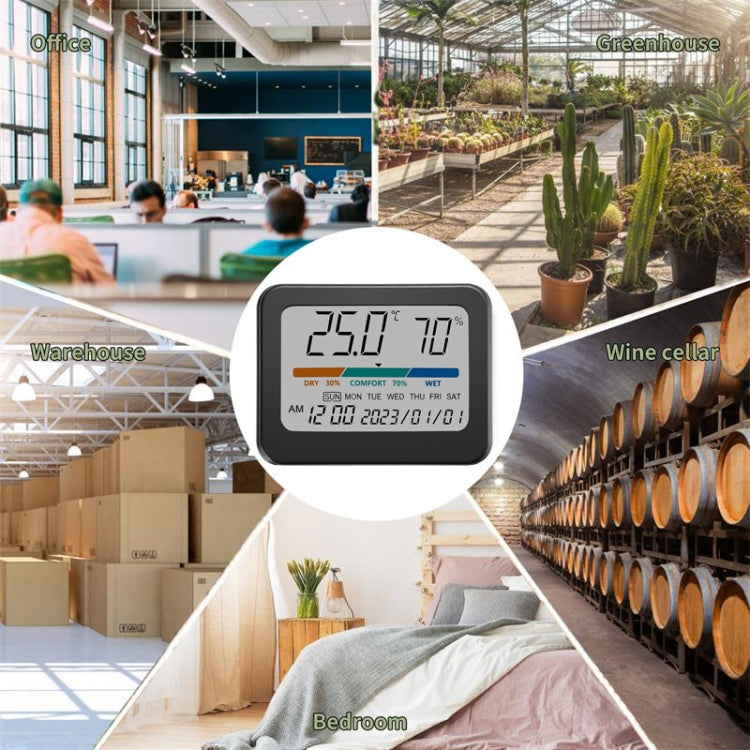
4. Comfort: Orange, green and blue color bars display. When the humidity is less than or equal to 29%, the triangle points to DRY; when the humidity is greater than or equal to 30% and less than or equal to 70%, the triangle points to COMFORT; when the humidity is greater than or equal to 71%, The triangle points to WET;
5. Display time (AM, PM: displayed in 12-hour format, not displayed in 24-hour format), date and week on the same screen;
6. Function buttons: three in total, SET (setting), +/Fahrenheit/Celsius (increase, Celsius/Fahrenheit conversion), -/12/24 (decrease, 12/24 hour format);
7. Power supply method: Use two CR2032 batteries (included) to supply power in parallel, doubling the standby time.
8. Shell material: ABS engineering plastic
9. Product size: 93 x 73 x 19mm
10. Display size: 76 x 51mm
11. Placement method: bracket/suspended/magnet adsorption
12. Net weight: 72 grams
Instructions:
1. After the product is powered on, press the SET button, and the date number will flash. At this time, press + or – to adjust the value. After adjusting, press the SET button again to adjust the year, month and day respectively. After adjusting one item, press the SET button to enter. Next item, finally adjust the hours and minutes of the time, and press the SET key to exit;
2. The temperature, humidity, comfort level, time, date and day of the week are displayed on the same screen. The numbers are clear and clear at a glance;
3. Increase, Celsius/Fahrenheit conversion key. After pressing the SET key, the function of this key is to increase; press this key alone to convert between Celsius and Fahrenheit; -/12/24 (decrease, 12/24 hour format) key. After pressing the SET key, the function of this key is to decrease; pressing this key alone is to convert the 12-hour format and the 24-hour format.
Specifications
- Product type
- Indoor Thermometer
- SKU
- TBD06042319
- Dispatch facility
- International Fulfillment Center (China)
Compatibility & fit
Product checks
Check fit before you buy
Review model, version, connector, size, photos, specifications and package contents before checkout.
Compatibility checklist
- Match the exact product, device, model, size, colour and variant shown in this listing.
- Brand names are used to identify compatibility unless the listing clearly states otherwise.
- This may be a repair or replacement part. Match the exact model, version, connector and part type before ordering.
- Professional installation may be required.
- For powered products, check voltage, wattage, current, connector type, charger compatibility and plug type before use.
Have questions about this product? Need help choosing? Contact our support team for assistance!


More from Home & Lifestyle
View all Home & Lifestyle-
Automatic Pop-up Card Holder Metal Card Box RFID Credit Card Bank Card Box Wallet(Black)
Regular price R 309.00Regular price -
C1804H1 RFID Carbon Fiber Wallet For Men(Black Carbon Fibers)
Regular price R 239.00Regular price -
Q1A 2 In 1 Wireless Carplay/AndroidAuto Box Smart Portable In-Car Connectivity Box, Spec: Silver White Lable
Regular price R 479.00Regular price -
Q15 Motorcycle Riding Wireless Bluetooth Handlebar Control Phone Button Remote Controller(Black)
Regular price R 419.00Regular price -
S308 Car Steering Wheel Wire Rope Lock Security Anti-theft Locks(Black)
Regular price R 579.00Regular price -
Outdoor Sports Riding Warm Gloves Touch Screen Fingerless Fishing Gloves, Size: L(Black)
Regular price R 359.00Regular price -
Pop-up Leather Metal Card Holder RFID Bifold Wallet(Carbon Fiber Black)
Regular price R 359.00Regular price -
2 PCS Car Seat Belt Extension Buckles - Black
Regular price R 239.00Regular price -
2 PCS H7 72W 1000LM 6000-6500K Super Bright White Light Car Fog LED Bulbs, DC 12-24V (White Light)
Regular price R 259.00Regular price -
Automatic Pop-up Card Holder Metal Card Box RFID Credit Card Bank Card Box Wallet(Brown)
Regular price R 319.00Regular price -
2 PCS H4 72W 1000LM 6000-6500K Super Bright White Light Car Fog LED Bulbs, DC 12-24V (Ice Blue Light)
Regular price R 269.00Regular price -

SKMEI 1637 Sports Digital Display Outdoor Shockproof Plastic Large Dial Men Watch, Color: Army Green
Regular price R 399.00Regular price -
Hearing Aids With Digital Display Charging Case Noise Cancelling Invisible In-Ear Sound Amplifier(Red Blue+Black Case)
Regular price R 1,019.00Regular price -
Hearing Aids With Digital Display Charging Case Noise Cancelling Invisible In-Ear Sound Amplifier(Skin Color+White Case)
Regular price R 1,019.00Regular price


