DC12V 1CH RF Remote Control Switch / 10A Relay / 433MHZ Switch Receiver
DC12V 1CH RF Remote Control Switch / 10A Relay / 433MHZ Switch Receiver

Spread the cost
No lump sum. No stress. Pick a repayment term that works for your budget — and keep your cash flow intact.
- R96.74/mo 3 months
- R48.92/mo 6 months
- R25.82/mo 12 months
- From R96.74/month over 3 months, or as low as R25.82/month over 12. Total repayable over 12 months: R309.84. Interest at 20.75% p.a. applies.
- Quick online application — most people get a decision within minutes. Your first payment only kicks in 30 days after you buy.
- Mobicred is a registered South African credit provider (NCR reg. NCRCP7852). Available to SA residents aged 18+ with a valid ID and bank account.
At checkout, simply select Mobicred as your payment method.
Continue to checkoutDon't have Mobicred yet? Apply free — takes about 2 minutes →
Mobicred is a revolving credit facility provided by Retail Capital (Pty) Ltd, a registered credit provider (NCR reg. NCRCP7852) in terms of the National Credit Act 34 of 2005. Credit is subject to approval and an affordability assessment. Interest rate: 20.75% p.a. compounded monthly (1.7292%/month). Available to South African residents aged 18 and older. Full terms & conditions apply.
Import Taxes Included
Read shipping & tax policy ›This product is priced for DDP import handling. KifTech handles applicable import costs before delivery:
- Import duties – Included where applicable
- Customs fees – Handled before delivery
- Shipping – Free on orders over R750. R49 standard rate below R750.
✓ The checkout total shows the product and shipping amount you pay to KifTech. No separate import duty payment should be required on delivery.
Free Shipping over R750
R49 below R750. Taxes included. Read policy ›
Estimated Arrival
8–17 business days after order placement.
Delivery Timeline
Order Processing (0–3 days)
Order verified and dispatched. Tracking details provided by email.
Transit (8–14 business days)
Package is shipped internationally to South Africa via Buffalo Logistics.
30-day refund / replacement
Read full return policy ›Shipping Protection
Read full policy ›Encrypted Checkout
Read privacy policy ›Checkout uses encrypted payment processing to help protect your personal and payment details.
Accepted via PayFast:
Product Overview
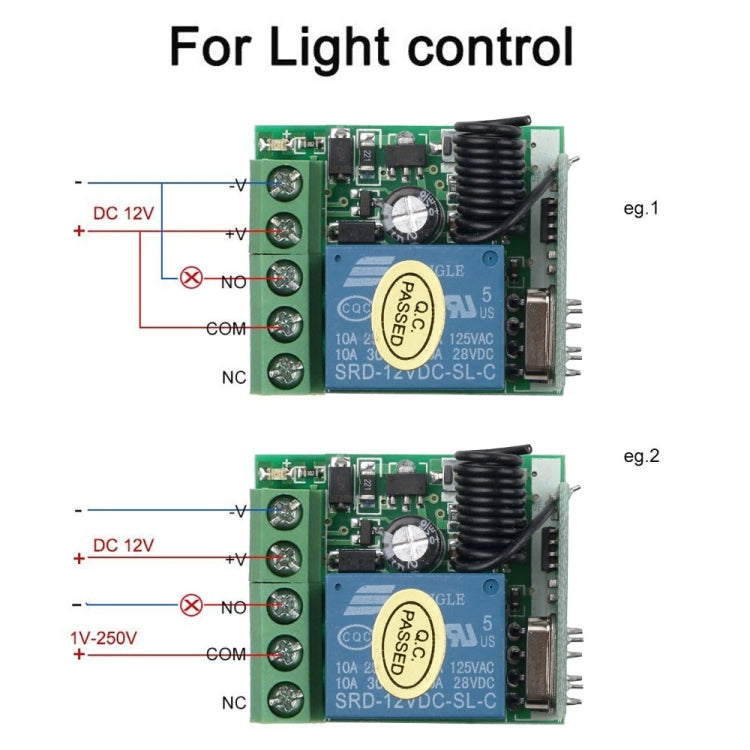
1. Output relay switching capability: Capable of controlling loads with voltages up to 250V. Requires a 12V power supply. 2. Small Size: The circuit board measures only 35x30x17mm.
3. User-Adjustable Operating Mode: Self-locking, interlocking, inching, and time-delay modes can be adjusted via pin short-circuit caps.
4. Learning Pairing: You can learn to pair with any remote controller with the same frequency (dont worry if you lose your remote during use; simply buy a new one and learn the code without having to replace the entire set, significantly saving costs).
Technical Parameters
1. Operating Voltage: DC 12V (3V/6V/9V/24V available on request)
2. Quiescent Current: Less than or equal to 10mA
3. Operating Temperature: -40 degrees Celsius to +80 degrees Celsius
4. Receiver Sensitivity: More than or equal to -95dB
5. Operating Frequency: Commonly 315MHz, 433.92MHz (other frequencies available on request)
6. Output Current: Less than or equal to 10A
7. Operating Mode: Inching, Self-Lock, Interlock, Delay (Adjustable)
8. Output Mode: Contact Output (AC and DC controllable)
Applications
This product uses an intelligent microprocessor control system and is suitable for garage door control, lighting control, remote curtain control, access control systems, and various motor control systems. It features a compact size, easy installation, and safe and reliable operation.
Learn How to Pair Code
1. Inching Learning Method:
Press the pairing button on the control panel once. The LED indicator will flash once. Then, press the button on the remote control to be paired. The LED indicator on the control panel will flash several times, indicating successful pairing.
2. Self-locking Learning Method:
Press the pairing button on the control panel twice. The LED indicator will flash twice. Wait until the LED indicator turns off. Then, press the button on the remote control to be paired. The LED indicator on the control panel will flash several times, indicating successful pairing.
3. Interlocking Learning Method:
Press the pairing button on the control panel three times. The LED indicator will flash three times. After the LED indicator turns off, press the A and B buttons on the remote control to be paired. The LED indicator on the control panel will flash several times, indicating successful pairing. 4. 5-Second Delay Learning Method:
Press the control panel pairing button 4 times in a row. The LED indicator will flash 4 times. After the LED indicator goes off, press the button on the remote control you want to pair. The control panel LED indicator will flash several times, indicating successful pairing.
5. 10-Second Delay Learning Method:
Press the control panel pairing button 5 times in a row. The LED indicator will flash 5 times. After the LED indicator goes off, press the button on the remote control you want to pair. The control panel LED indicator will flash several times, indicating successful pairing.
6. 15-Second Delay Learning Method:
Press the control panel pairing button 6 times in a row. The LED indicator will flash 6 times. After the LED indicator goes off, press the button on the remote control you want to pair. The control panel LED indicator will flash several times, indicating successful pairing.
Precautions
1. Do not operate with power on. Always turn off the power before operating. Only power on after confirming that everything is working properly.
2. If the remote control battery voltage is low, please replace the batteries immediately. (A low battery voltage in the remote control generally reduces the control range.) 3. When using wireless electronic products, avoid strong interference sources such as metal covers, large electronic devices, and electromagnetic fields to prevent the remote control from being too close to the receiver or causing it to malfunction.
4. Do not use this electronic product improperly. Improper use can reduce product performance and lifespan, and in severe cases, damage the product and pose a safety hazard.
5. The delay time setting is automatically set when entering learning mode. The delay time setting is linked to the number of times the learning button is pressed. Please pay special attention to this.
Product checks
Check fit before you buy
Review model, version, connector, size, photos, specifications, and package contents before checkout.
Compatibility checklist
- Match the exact product, device, model, size, colour, and variant shown in this listing.
Have questions about this product? Need help choosing? Contact our support team for assistance!