


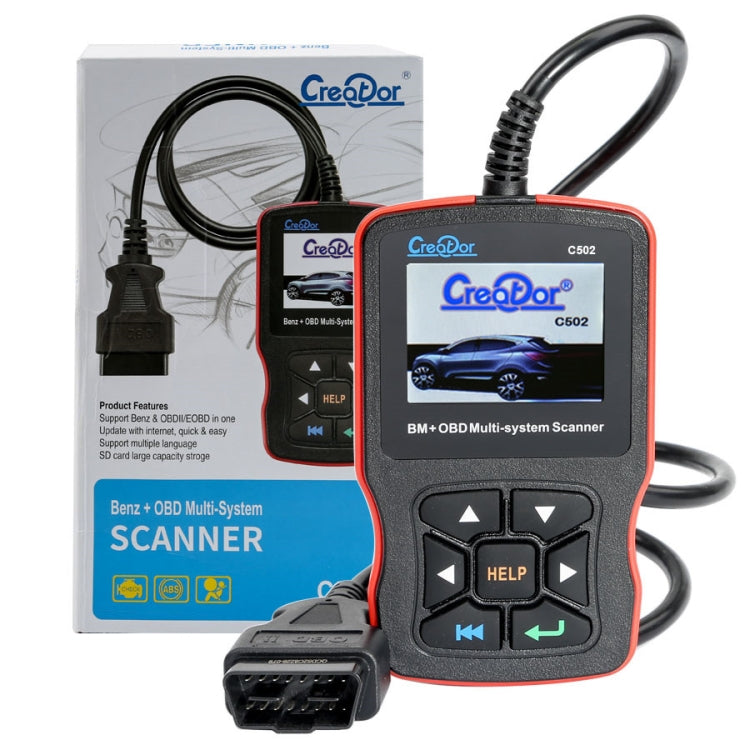
Creator C502 V7.6 Car OBD2 Multi-system Scanner Car Diagnostic Tool for Mercedes-Benz before 2016
Creator C502 V7.6 Car OBD2 Multi-system Scanner Car Diagnostic Tool for Mercedes-Benz before 2016
Free shipping on this item

Pay with Mobicred
Mobicred is a revolving credit facility. One monthly account payment covers your purchases.
- Interest and fees apply. Your repayment amount, interest rate and applicable fees are set out in your Mobicred agreement.
- Credit is subject to approval and an affordability assessment. You need an approved Mobicred account and sufficient available credit.
Choose Payfast at checkout, then select Mobicred on the Payfast payment page where it is available.
Mobicred credit is provided by RCS Cards Proprietary Limited, trading as Mobicred. RCS is a registered credit provider (NCRCP38). Read Mobicred terms and conditions
Free Shipping over R750
R49 on orders of R750 or less. Duties included, no VAT collected. Read policy ›
Delivery timeline
Shipping protection Read full policy ›
Duties included at checkout, no VAT collected
Read shipping and duties policy ›KifTech uses a Delivered Duty Paid (DDP) delivery process for all orders. Applicable import duties and customs fees are included in the price shown at checkout and handled before delivery. No VAT is collected from you at checkout.
- Import duties – Included in the price shown at checkout where applicable
- Customs fees – Included in the price shown at checkout and handled before delivery
- Shipping – Free on orders over R750. R49 standard rate on orders of R750 or less.
✓ The checkout total shows the product amount and any shipping charge. Applicable import duties and customs fees are included in the price shown at checkout. No VAT is collected from you at checkout. No separate duties or customs-fee payment should be required on delivery.
30-day returns & 6-month fault cover
Read full return policy ›Encrypted Checkout
Read privacy policy ›Checkout uses encrypted payment processing to help protect your personal and payment details.
Accepted payment methods:
Description
2. Supports for the Mercedes-Benz models before 2016
Include Chassis: 117, 129, 140, 156, 163, 164, 166, 168, 169, 170, 171, 172, 176, 197, 199, 202, 203, 204, 205, 207, 208, 209, 210,211, 212, 215, 216, 217, 218, 219, 220, 221, 222, 230, 231, 240, 245, 246, 251, 253, 292, 461, 463, X 164, X 204.
Note: 1. It does not support Mercedes-Benz cars before 2016 without OBD2 interface. 2. Does not support Smart and Sprinter models.
3. Functions: Read codes, Erase codes, ECU information
4. Creator C502 OBDII & EOBD Software Description:
Easily determines the cause of the Check Engine Light ( MIL)
Retrieves generic (P0, P2, P3, and U0) and manufacturer specific (P1, P3,and U1) codes
Turns off Check Engine Light (MIL), clears codes and resets monitors
Displays DTC definitions on unit screen
Views freeze frame data
Identifies pending codes
Reads live PCM datastream
Graph displays live PCM datastream
Read I/M Readiness Status
Displays live O2 sensor test data
Performs modules present test
Retrieves vehicle information (VIN, CIN and CVN)
Supports CAN (Controller Area Network) and all other current OBD-II protocols
5. Specifications:
(1). Display: Color, 320 x 240 pixel display with contrast adjustment
(2). Operation Temperature: - 20~75 degree Celsius
(3). Storage Temperature: -40~120 degree Celsius
(4). Power: 8V -- 24V
6. A communication error occurs if the scan tool fails to communicate with the vehicle ECU (Engine Control Unit).
You need to do the following to check up:
(1). Verify that the ignition is ON;
(2). Check if the scan tools OBD II connector is securely connected to the DLC of vehicle;
(3). Verify that the vehicle is OBD2 compliant;
(4). Turn the ignition off and wait for about 10 seconds. Turn the
(5). Ignition back to on and continue the testing.
(6). Verify the control module is not defective
7. Scan tool does not power up
If the scan tool won not power up or operates incorrectly in any other way, you need to do the following to check up:
(1). Check if the scan tool OBD II connector is securely connected to the DLC of vehicle;
(2). Check if the DLC pins are bent or broken. Clean the DLC pins if necessary.
(3). Check vehicle battery to make sure it is still good with at least 8.0 volts.
8. Package List:
1 x C502 Machine
1 x Manual
Specifications
- Product type
- Code Readers & Scan Tools
- SKU
- CRP0306
- Dispatch facility
- International Fulfillment Center (China)
Compatibility & fit
Product checks
Check fit before you buy
Review model, version, connector, size, photos, specifications and package contents before checkout.
Compatibility checklist
- Match the exact product, device, model, size, colour and variant shown in this listing.
- Brand names are used to identify compatibility unless the listing clearly states otherwise.
- This may be a repair or replacement part. Match the exact model, version, connector and part type before ordering.
- Professional installation may be required.
Have questions about this product? Need help choosing? Contact our support team for assistance!


More from Car Tech
View all Car Tech-
Q1A 2 In 1 Wireless Carplay/AndroidAuto Box Smart Portable In-Car Connectivity Box, Spec: Silver White Lable
Regular price R 479.00Regular price -
Q15 Motorcycle Riding Wireless Bluetooth Handlebar Control Phone Button Remote Controller(Black)
Regular price R 419.00Regular price -
S308 Car Steering Wheel Wire Rope Lock Security Anti-theft Locks(Black)
Regular price R 579.00Regular price -
2 PCS Car Seat Belt Extension Buckles - Black
Regular price R 239.00Regular price -
2 PCS H7 72W 1000LM 6000-6500K Super Bright White Light Car Fog LED Bulbs, DC 12-24V (White Light)
Regular price R 259.00Regular price -
2 PCS H4 72W 1000LM 6000-6500K Super Bright White Light Car Fog LED Bulbs, DC 12-24V (Ice Blue Light)
Regular price R 269.00Regular price -
2 in 1 mini USB Wired to Wireless Car CarPlay / Android Auto Box Adapter(Silver)
Regular price R 569.00Regular price -
HOD H7 Halogen Bulb, Super White Car Headlight Bulb, 12 V / 100W, 6000K 2400 LM (Pair)
Regular price R 299.00Regular price -
4 PCS 2.4 Bar Tire Pressure Detection Screw Cap
Regular price R 199.00Regular price -
Legend II Generation 12V to 220V 4000W Modified Square Wave Car Power Inverter(Yellow)
Regular price R 879.00Regular price -
For Land Rover Left Driving Car Special Mobile Phone Navigation Bracket Base, Model: 10-16 Discovery 4
Regular price R 209.00Regular price -
Car Scratch Repair Pen Maintenance Paint Care Car-styling Scratch Remover Auto Painting Pen Car Care Tools (Silver)
Regular price R 179.00Regular price -
2 PCS H4 60W 1200 LM 6000K Car Fog Lights with 12 XB-D LED Lamps, DC 12V (White Light)
Regular price R 349.00Regular price -
2 in 1 3ml Paintless Dent Removal Car Window Windshield Repair Fluid with Tool (Black)
Regular price R 179.00Regular price


