WERSI UM-18 USB MIDI Cable MidiPort Midi Cable Electric Piano Electronic Drum Music Editing Line, Length: 2m(Red)
WERSI UM-18 USB MIDI Cable MidiPort Midi Cable Electric Piano Electronic Drum Music Editing Line, Length: 2m(Red)

Spread the cost
No lump sum. No stress. Pick a repayment term that works for your budget — and keep your cash flow intact.
- R211.16/mo 3 months
- R106.77/mo 6 months
- R56.35/mo 12 months
- From R211.16/month over 3 months, or as low as R56.35/month over 12. Total repayable over 12 months: R676.2. Interest at 20.75% p.a. applies.
- Quick online application — most people get a decision within minutes. Your first payment only kicks in 30 days after you buy.
- Mobicred is a registered South African credit provider (NCR reg. NCRCP7852). Available to SA residents aged 18+ with a valid ID and bank account.
At checkout, simply select Mobicred as your payment method.
Continue to checkoutDon't have Mobicred yet? Apply free — takes about 2 minutes →
Mobicred is a revolving credit facility provided by Retail Capital (Pty) Ltd, a registered credit provider (NCR reg. NCRCP7852) in terms of the National Credit Act 34 of 2005. Credit is subject to approval and an affordability assessment. Interest rate: 20.75% p.a. compounded monthly (1.7292%/month). Available to South African residents aged 18 and older. Full terms & conditions apply.
Import Taxes Included
Read shipping & tax policy ›This product is priced for DDP import handling. KifTech handles applicable import costs before delivery:
- Import duties – Included where applicable
- Customs fees – Handled before delivery
- Shipping – Free on orders over R750. R49 standard rate below R750.
✓ The checkout total shows the product and shipping amount you pay to KifTech. No separate import duty payment should be required on delivery.
Free Shipping over R750
R49 below R750. Taxes included. Read policy ›
Estimated Arrival
8–17 business days after order placement.
Delivery Timeline
Order Processing (0–3 days)
Order verified and dispatched. Tracking details provided by email.
Transit (8–14 business days)
Package is shipped internationally to South Africa via Buffalo Logistics.
30-day refund / replacement
Read full return policy ›Shipping Protection
Read full policy ›Encrypted Checkout
Read privacy policy ›Checkout uses encrypted payment processing to help protect your personal and payment details.
Accepted via PayFast:
Product Overview
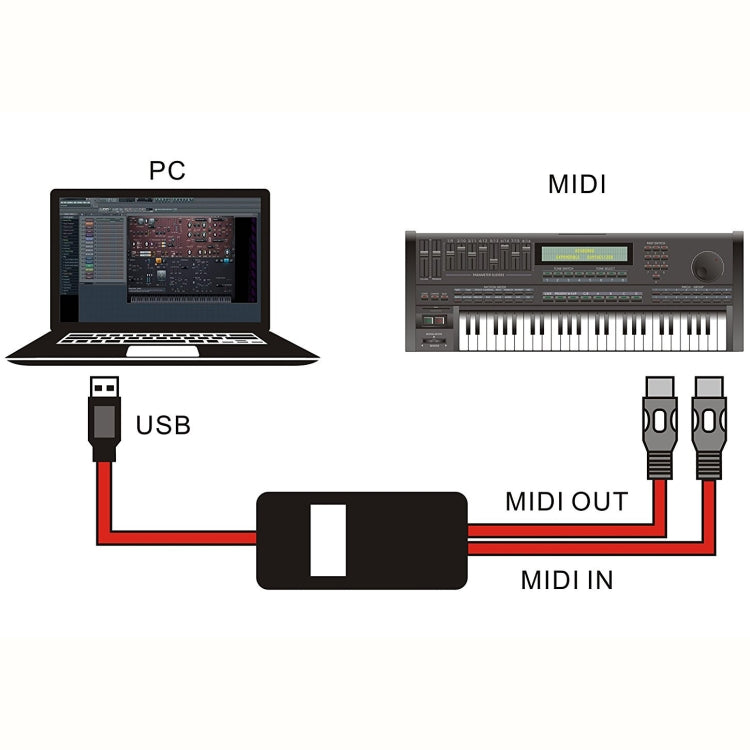
1. USB IN-OUT MIDI Cable Converter, Professional PC/Laptop/Mac to Music Music Adapter Line for Home Music Studio.
2. The USB port is connected to the computer, plug and play, and conforms to the USB audio device class V2.0 specification.
3. No additional drivers are required, no external power supply (USB bus 500 mAh).
4. 16 Midi input channels / 16 Midi output channels.
5. Support music editing software such as cubase and cakewalk.
6. Two five-pin round plugs: Midi input/output, respectively connected to the electronic musical instruments Midi out and Midi in
7. Can be used for connection between electronic instruments such as piano, keyboard, electric piano, hand roll piano, electric guitar (effect) and computer (sound card).
8. Use the software to create your own music or enjoy your favorite Midi music.
9. Professional voice control chip.
10. USB cable length: 1.5 meters, Midi line length: 0.5 meters.
11. LED indicator: Power - Red LED, Midi signal - Blue LED.
12. Support system: Win10 (32bit/64bit) / 8 / 7 / 98 / 2000 / XP / Vista (32bit/64bit) / Linux etc.
Instructions for use:
1. Connect the cable marked IN to the MIDI OUT socket of a MIDI keyboard or MIDI device.
2. Connect the cable marked OUT to the MIDI IN socket of a MIDI keyboard (or MIDI device).
3. Plug the USB cable into any free USB socket on your computer.
4. Open your music software program, e.g. Cubase, Sonar, MIDI Connections, etc.
5. Set the music programs MIDI in and MIDI out devices to USB Audio Device.
6. Your USB to MIDI interface is now ready for use.
7. To save potential problems, it is recommended that this interface is always connected to the same SUB as it was originally installed on USB to prevent multiple installations of the driver.
Attention:
If your Mac USB Port is USB-C (Thunderbolt 3), please use original authentic USB-C to USB Adapter from the manufacturer or MIDI interface may not work.|
Package Included:
MIDI Cable x 1
User Manual x 1
Product checks
Check fit before you buy
Review model, version, connector, size, photos, specifications, and package contents before checkout.
Compatibility checklist
- Match the exact product, device, model, size, colour, and variant shown in this listing.
- For powered products, check voltage, wattage, current, connector type, charger compatibility, and plug type before use.
Have questions about this product? Need help choosing? Contact our support team for assistance!